Manager mode
Some tasks are too big for one context. Migrating five services, building a feature that touches the API, the CLI and the docs, or chasing a bug through a codebase you don't know: by the time the agent has read everything, the conversation is full of file contents and command output, compaction starts dropping things at random, and the end of the task gets less care than the start.
Manager mode splits the job differently. The main agent becomes a coordinator: it plans, writes briefs, hands each piece to a worker, checks what comes back, and keeps the overall picture. The workers do the reading and editing in their own fresh contexts, so the main conversation only holds plans, decisions and results.
Manager mode is opt-in. Turn it on once with /extensions on manager; that
adds /manager and lets the agent switch the mode on by itself.
❯ /manager on migrate the billing, auth and search services to the new config loader
When to use it
It pays off when the work splits into pieces that don't touch each other much:
- a large task with several loosely coupled parts (one service, module or endpoint each)
- a long task whose exploration would otherwise flood the conversation
- work where you want each change checked before it's built on
It isn't worth it for a small fix, or for tightly coupled changes where every
piece depends on the others; one agent working straight through does those
better. The agent knows this too: once the extension is on, it can switch
manager mode on by itself when a task looks large and separable, and it tells you when it does
and why. Saying "don't use manager mode for this" works as well as /manager off.
What changes while it's on
- The agent coordinates. It hands substantial work to workers so its own context stays on planning and checking. Nothing stops it from editing: a one-line fix or a small follow-up it makes itself, at its own judgement.
- Results get checked. The agent reads each worker's diff, runs a focused test or asks a reviewer worker, then marks the worker accepted or rejected. A plan step linked to a worker can't be ticked off until that worker is accepted, so "done" in the task list means someone looked.
- Independent pieces run in parallel. Workers on separate pieces run in the background while the agent keeps going (and keeps talking to you); a step that depends on another gets the earlier worker's report in its brief.
- Decisions are written down. Choices every worker must stay consistent with
("exports use CSV", "keep the old flag as an alias") go in
.pcode/manager/decisions.md, and the agent passes the relevant ones into each brief. You can edit that file yourself between turns. - It learns between runs. When manager mode ends, the agent adds a few
lessons to
.pcode/manager/lessons.mdin the project's main checkout (briefs that went wrong, splits that worked), and they're read back at the start of every later managed turn, in any session or worktree of that project.
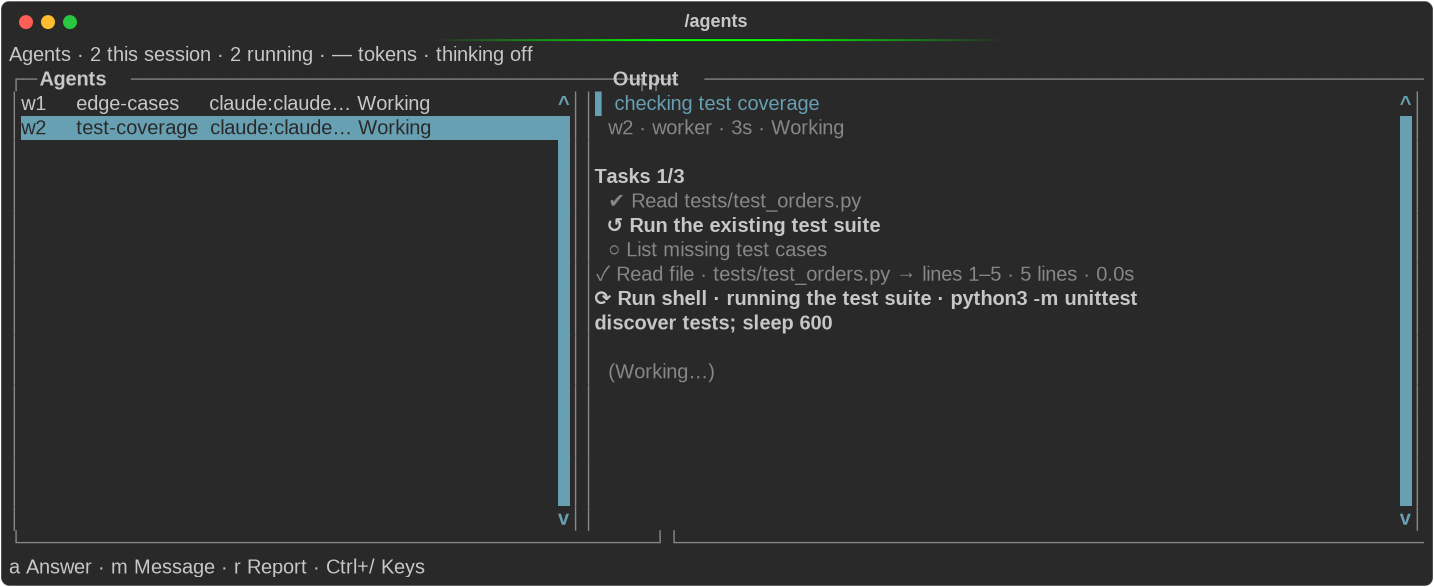
Watch it all in /agents: each worker's id, the plan step it's on, its state,
whether it's been reviewed, and its token count. A worker that gets stuck can
ask the agent a question; you can answer it from there, or send a worker a
message. See talking to workers.
Workers in their own worktrees
If worktree is on, manager mode
gives every worker its own checkout and branch for the session, as if
worker_isolation were on too, so parallel workers
can't trip over each other's edits. The agent merges each accepted worker's
branch into the session's branch. Isolated workers start
from the session's last commit, so the agent commits a checkpoint before
delegating. Isolated workers
can't be resumed for a follow-up, so a rework gets a fresh worker briefed with
the review note. With worktree off, workers share the session's checkout, and
/manager status says so.
Cost controls
Workers spend tokens, and several in parallel spend them fast. Two settings keep that in check:
pcode config set manager_token_budget 2000000            # stop delegating after ~2M worker tokens
pcode config set manager_worker_model anthropic:claude-sonnet-5   # default model for workers
Once the budget is spent, the agent can't start new workers: it finishes with what it has and tells you, and you can raise the budget to carry on. The worker model applies when the agent doesn't pick one itself, which makes it easy to run the routine pieces on a cheaper model while the coordinator stays on the session's. Both are read at each delegation, so no reload is needed. See configuration.
Commands
/manager on [request]switches it on; any text afteronis sent as the first request. Bare/manager requestdoes the same./manager statusshows whether it's on and why, each worker with its state, review and tokens, the budget used, the worker model, and whether workers get their own worktrees./manager offswitches it off.
Manager mode is saved in .pcode/manager/, so it stays on across /reload and
restarts until it's switched off. The worker list and the token count behind
the budget live in memory, so they start over after a /reload or restart. It works alongside /plan:
plan first, then let the manager carry the plan out. Side questions and the
workers themselves are never affected. /extensions off manager removes it
again, including the agent's ability to switch it on.