Side questions (/btw)
/btw QUESTION (or /side QUESTION, the same command) asks about what the
model is doing while it is doing it. The
question runs as a separate request alongside the turn, against the same
context. The turn is not interrupted or steered, and the question stays out of
the conversation unless you choose to keep it.
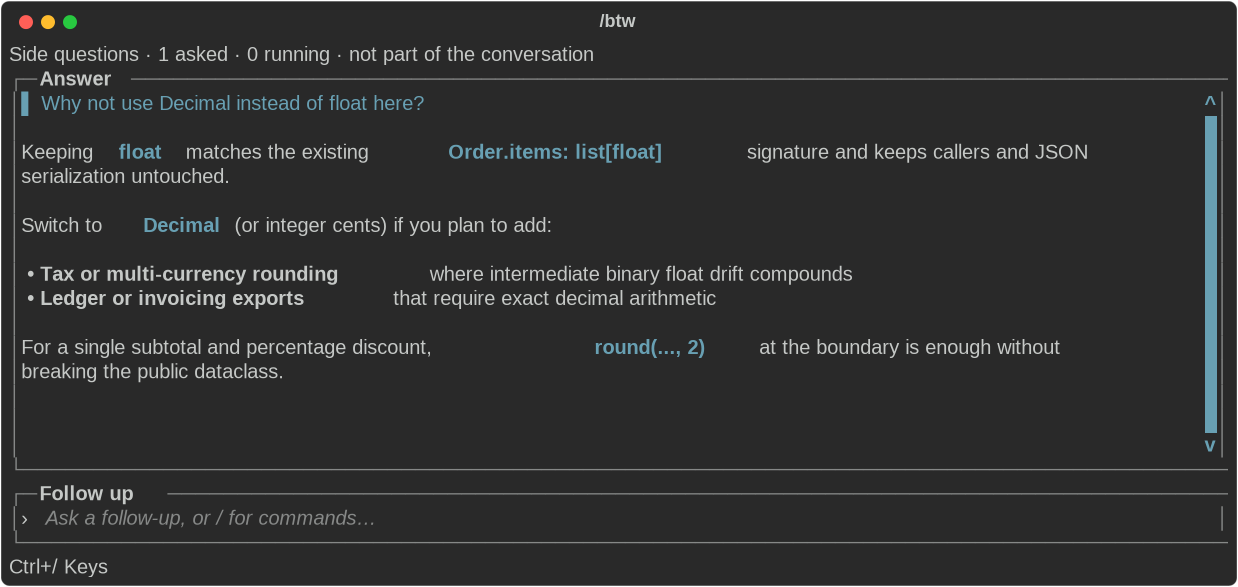
❯ refactor the parser and make the tests pass
  ◜ Running shell · uv run pytest
❯ /btw why did you pick a recursive descent parser?
  ◈ Side question asked beside the conversation…
  ◈ Side answer ready (why did you pick a recursive descent parser?). Opening it.
While a side question runs it has its own spinner row in the live panel above
the editor, below the turn's, in the muted shade: the question, what the model
is doing for it, and how long it has taken. Up to three show; more fold into a
count that /btw expands.
The answers open by themselves as soon as one is ready, since the point of a
side question is reading the answer while the turn is still running. A bare
/btw opens them at any other time, and an answer still arriving streams in.
The popup
Unless a drawer shows them, threads show in a viewer
with a follow-up editor of its own. It takes the whole terminal while it is
open, or in Ghostty Smooth opens over the conversation.
Ctrl+Q opens it, as a bare /btw does:
- ↑ / ↓: move through the questions, or scroll the answer when it has focus.
- Enter: read the selected thread full width, with the question list hidden; Escape brings the list back. A viewer that opens on a single thread starts full width, and Escape shows the list once a second arrives.
- Tab: move between the question list, the answer pane and the follow-up editor. While the command menu is open, Tab and Shift+Tab move through it instead.
- Ctrl+R: type a follow-up to the selected answer.
- Ctrl+S / Ctrl+T: bring the thread into the conversation, as a summary or merged into the tree.
- Ctrl+Y: copy from the selected thread with the same layout as
/copy: the list holds each answered question in the thread and its answer, with a row for every quote and code block under the answer, and the pane beside it highlights exactly what Enter (or Ctrl+Y again) copies. The newest answer is selected first. Copying also works mid-stream, taking what had arrived when you pressed Ctrl+Y. Escape or Ctrl+C goes back to the thread without copying, and neither changes the thread or the follow-up draft. A thread holding a single plain answer is copied straight away. - Ctrl+O: pick a link from the selected thread's questions and answers and
open it in the browser, as
/linksdoes for the conversation. - Ctrl+K: stop every running side question, keeping the records.
- Ctrl+C: stop the running side questions, as Ctrl+K does; with nothing running, close the popup.
- Escape: close the popup and restore the editor draft (from a full-width thread it first brings the list back). Enter closes it too when there is no list to pick from.
- Ctrl+Q: close the popup at once, the same key that opened it. It waits while a follow-up draft is open, so you don't lose it, and does nothing over the copy browser or link picker, where Escape steps back.
- Ctrl+G: hand the mouse to the terminal to select text, and take it back; other popups do this on Ctrl+Q.
The r/y/o/s/t/k/q/g actions work from the list, the answer and the
follow-up editor alike. By default, hold Ctrl while pressing the letter; a
configured shortcut prefix changes these keys.
Ctrl+/ browses the current popup's help.
Threads in a drawer
Experimental. In Ghostty Smooth with a session host, a thread opens in a drawer
beside the conversation instead of the popup. The drawer is a terminal of its
own, so the thread keeps your terminal's font and colors, and you can scroll
and select it there. The thread is headed btw and its first question in a
colour of its own. The screen keeps the conversation, so a running turn goes
on streaming beside it.
The main editor talks to the open thread, with everything it can do (history,
completion, vi mode, @files):
- Enter sends a follow-up to the thread, never to the conversation, so typing during a turn neither steers nor queues it. The editor's border takes the thread's colour while this is so. A follow-up that cannot be sent yet keeps your draft and says why. The answer streams into the drawer a block at a time, as the conversation's do.
/merge,/summarize [focus],/copy,/links,/stop,/closeact on the thread (commands); every other command, and/btw QUESTION, means what it always does. A!commandor a command for the conversation, such as/help, closes the thread first, and Ctrl+Enter interrupts the conversation's turn with your message.- Ctrl+Q toggles: with a thread open it closes the drawer and the editor goes back to the conversation, however many threads there are; from the conversation it opens the thread you last looked at (the newest the first time). It works the same in every editor mode.
- A bare
/btwlists the threads when there is more than one, with the newest unread answer selected and a preview beside the list. Enter opens the highlighted thread in the drawer; Escape leaves things as they were. With a single thread it opens that one at once. - Ctrl+\ opens the next older thread, and from the oldest wraps to the
newest. With a shortcut prefix, these keys
are the prefix and
qor\. If your vi leader is\, use Ctrl+\ itself, since a second\only closes the leader menu. - Escape goes back to the conversation, keeping your draft. In vi mode, Escape first leaves insert mode as usual, and a second one goes back; Ctrl+Q needs no second press.
An answer that opens by itself waits while you have a draft in the editor:
opening it then would send your half-written message to the thread. Ctrl+Q,
or picking it after a bare /btw, opens it when you are ready.
Without a drawer (another terminal, no session host, or popup_view popup),
side threads use the popup. If the drawer goes away while a
thread is open, the thread closes and the editor goes back to the
conversation.
Commands
The main editor with a thread in the drawer and the popup's follow-up editor take these as
commands. In the popup a menu completes them as you type /, and the start of
a single name (/co) is enough on its own:
| Command | Does |
|---|---|
/copy |
Choose a question, answer, quote or code block from this thread to copy, as Ctrl+Y |
/links |
Open a link from the thread, as Ctrl+O |
/summarize [focus] |
Send the model a summary of the thread, keeping what focus says, as Ctrl+S |
/merge |
Merge into the conversation, as Ctrl+T |
/stop |
Stop running side questions, as Ctrl+K |
/close |
Go back to the conversation, as Escape (drawer thread only) |
A follow-up that starts with a path of more than one part, such as
/etc/hosts, is still sent as a question; one like /tmp reads as a command
name, so put a word before it.
To keep the answers out of the way until you ask for them, turn auto-open off:
pcode config set btw_auto_open off # Default on; applies immediately
With it off, a ready answer only prints its transcript notice and waits for a
bare /btw. Auto-open never interrupts a popup or command already using the
terminal (it queues behind it), and it does nothing when the viewer is already
open, because an open viewer follows new answers on its own.
The footer counts side questions that are running and answers that are
ready (settled but not yet opened). Ctrl+C at the prompt stops running side
questions only when nothing else is in flight, so an interrupt aimed at the turn
never throws away the side question as well.
Following up
With a thread in the drawer, the main editor sends
follow-ups to it. The popup has an editor under the answer for asking a
follow-up, so a side question can become a short back-and-forth without
leaving it. Press
Ctrl+R (or Tab to it), type, and press Enter to send; Ctrl+J (or
Shift+Enter, where the terminal reports it) adds a line. The draft grows to six
rows before it scrolls, and PgUp / PgDn scroll the answer while you type.
Escape leaves the editor and keeps the draft, returning to the list, or to
the answer when the list is hidden; from there Escape works as above. A bare
/btw opens on the newest thread with the cursor in this editor, so a
follow-up is just typed. When the viewer opens by itself because an answer
arrived, it starts on the list (or the answer, for a single thread) instead,
since you may be mid-keystroke at the main prompt.
A follow-up joins the selected question's thread. The list shows one row per thread, with a follow-up count, and the answer pane shows the whole exchange in order, opening on the newest question. Each follow-up:
- continues the thread, not the conversation. It sees what the previous answer saw, plus that answer, so the prompt cache covers it; what the main turn did since does not reach the thread.
- runs where the thread began: the same model, effort and conversation id,
even if
/modelor/efforthas changed the conversation's since. A thread started with$MODELor+LEVELkeeps them; a/btwthat fanned out to several models is one thread per model. A follow-up can hold one$MODEL[+LEVEL]or+LEVELword of its own, read as in/btw, to switch models:$MODELmoves the thread to that model, and a bare+LEVELkeeps the thread's model at another effort. The next follow-up stays where this one went. A switched follow-up still sees the whole thread, but starts without its prompt cache. - waits for the answer before it. Sending while the newest answer is still
arriving is refused, in the popup editor's title or a notice above the
main one, and the draft stays. If a
follow-up fails, the next one continues from the last answer that arrived; a
thread with no answer at all cannot be followed up, so ask again with
/btw.
Follow-ups are side questions in every other way: same limits, same refused tools, same footer counts and ready notices, and nothing joins the conversation until you keep the thread. The viewer lists up to 20 threads, dropping the oldest settled thread whole; the session keeps them all (see saved with the session).
Keeping a thread
A thread that turned up something worth keeping can be brought into the conversation from the viewer, in two ways. Both close the viewer.
Ctrl+S: Send the model a summary. The editor asks for optional instructions ("keep only the decisions", "what should change in the plan?"); press Enter with nothing typed to summarize as is, or Escape to cancel and get your follow-up draft back. The summary is asked in the thread, on its model and after its last answer, so it reuses the thread's cache. When it is ready it is sent to the conversation's model as a message from you, word for word as the thread's model wrote it, exactly as if you had typed it:
- A turn is running: the summary steers it, joining at the model's next request, so the work in progress can change course.
- Nothing is running: the summary starts a turn, and the model acts on it straight away; there is no need to follow it with "go ahead".
Summarizing never waits for a turn and never holds your prompts back: it runs
beside the conversation like a side question, with a row above the prompt while
it is written. Ctrl+C on a running turn stops it too, so it cannot start a new
turn right after you stopped one; /stop in the thread stops it on its own.
Either way nothing is sent.
Ctrl+T: Merge into the conversation. Merging waits for the running turn,
the way forking in /tree does: the conversation's history cannot change under
a turn that is about to write it back, so pressing it mid-turn says so in the
header and does nothing else. The thread is already a branch of the
conversation tree, forked from the point where it was
asked (see saved with the session). Merging moves the
conversation onto it when that loses nothing. What happens depends on what
happened since:
- Nothing: the thread was asked while idle and the conversation has not moved, so the thread is simply its continuation. The conversation switches to its last answer and the transcript shows the questions and answers.
- Anything else (the thread was asked mid-turn, or turns,
/compactor a/treeswitch came after): the thread stays a branch, and the conversation stays where it is. Open/treeto switch to it. Moving there automatically would drop whatever the conversation did after the question was asked.
Merged history is the thread's exactly, framing included, so the model can
tell those exchanges were side questions. /continue refuses on a merged
question, since resending would answer it again as a real turn;
send a message instead. A thread asked before /new or /resume belongs to
that other conversation and cannot be kept here. The viewer's list marks a kept
thread merged or summarized; summarizing it again sends another summary.
What a side question can and cannot do
A side question runs on the conversation's own agent: the same model, instructions, tools, enabled MCP servers and model settings as the turn beside it (unless you choose another model). The provider's prompt cache therefore covers everything but the question itself, so a side question costs little more than the question.
Tools work as they do in a turn. The model can read files, search the web, use
MCP tools, and run shell commands or edit files if the question calls for it,
with the usual permission checks. The exceptions are the tools that change the
conversation itself: the plan (write_plan, add_task, update_task_statuses
and the rest; read_plan is fine) and delegation (delegate_task, and anything
but listing in task_worktree and manage_worker). A call to one is refused, and the model
carries on answering. If the answer implies work, send it as a normal message.
Nothing about a side question joins the conversation:
- no change to the model's history, so the next real turn is unaffected;
- no change to where the conversation is: its tree node is a branch beside it (see below), and resuming or replaying the session draws the conversation without it.
That holds until you keep the thread, which is the one deliberate way in.
Saved with the session
Each question is saved in the session when its answer settles (answered,
stopped or failed), as a node in the conversation tree:
a btw: row forked from where the thread was asked, with each follow-up under
the answer it continued. That happens even while a turn is running, without
touching the turn. So a thread outlives the session: after /resume, /btw
lists it again, read, and a follow-up continues from its saved history.
/tree shows it as a branch you can switch to, like any turn, and the
session's search finds it. A question still running when pcode exits is not
saved.
What it does share is the context it was asked against and the session's token
totals: the request really happened, so /status counts it.
Choosing the model
$PROVIDER:MODEL words pick the model a side question runs on, wherever they
sit in the line; the rest of it is the question.
❯ /btw $anthropic:claude-sonnet-5 is this migration safe?
❯ /btw second opinions on the plan? $claude:claude-opus-5-5 $openai-codex:gpt-6-astra
Only the full id under a provider pcode knows counts, so $HOME,
$PATH:/usr/bin, $image:latest or a bare $opus in a question stay
ordinary text; so does an id in backticks. A question about two models
(/btw is `$openai:gpt-5` faster?) needs those backticks, or it asks
them instead. Typing $
anywhere in a /btw line completes model names from the same catalog as the
/model picker, matching any part of the name ($opus finds
anthropic:claude-opus-…), and picking one writes the full id; a $ that
matches no model just shows no list. A normal prompt can hold one
$PROVIDER:MODEL[+LEVEL] or +LEVEL word to
pick its model for that turn alone, and $
completes there too.
- No
$: the conversation's model, sharing its prompt cache as described above. Naming the conversation's own model is the same thing. - Another model: the same agent, tools, history and framing, but the
model's own settings: its defaults and its saved
/effort, never the conversation model's. It starts without the conversation's cache, so its first request pays full price for the whole conversation. - Several models: one side question per model, started together. Each has
its own row, answer, error and
errors.logentry, and one failing does not affect the others. Rows, the viewer list, and the ready notices carry a short model label (the name without its provider, unless two would look the same). Repeated models collapse to one, and at most 4 models can be named at once.
A name that cannot be resolved (unknown provider, missing credentials or SDK)
fails the whole /btw command before any side question starts. /btw $MODEL
with no question is an error too.
Choosing the effort
A +LEVEL suffix sets the reasoning effort for one side question, using the
levels /effort accepts: low, medium, high, xhigh and default. A bare
+LEVEL word asks on the conversation's model; on a $ word it applies to
that model alone.
❯ /btw +low what was the last file edited?
❯ /btw $openai:gpt-5+high $anthropic:claude-opus-4-5+low which approach is safer?
❯ /btw +low +xhigh is this lock ordering right?
- No suffix: the model's usual effort, as above.
- The conversation's model: it stays on the conversation's own path with that effort in place of the current one, for this question only. A different effort can miss the conversation's prompt cache.
- Another model: the effort replaces that model's saved
/effort. default: drops the effort setting, so the provider's own default applies, exactly as/effort defaultdoes.
The same model at two efforts is two side questions; labels show the effort
(gpt-5 · high, or just low on the conversation's model) so their answers
stay apart. The effort is only read from a word of its own or the last + in
a model word, and only when a real level follows, so model ids that contain
+ still work and an unknown level (+1) is ordinary text. An effort on a
model /effort cannot set fails the command (it supports OpenAI/Codex models,
the Anthropic and Claude Code models whose profile has effort control, Gemini
models that think, and Antigravity models that offer a thinking level). Typing
+ anywhere in the line completes the levels.
Which context it sees
A side question sees what the running turn is working with right now, not the state before the turn started, up to the last completed step. A tool call that has not returned yet is left out, and so is the text streaming beside it.
Side questions are bounded by time: 300 seconds each, with no cap on model requests, so one that needs to dig can finish. They are not retried, and they do not survive exiting pcode.
When one fails or times out, the viewer shows the error and the traceback is
appended to the session's errors.log, the same file failed turns write to,
under a run aside <id> header with the question. A stopped side question
writes nothing.
Parallel work and /tree
/tree opens while a turn is running, but only to read: the header says
read-only while working and Enter does not switch context, since the running
turn would overwrite the switch when it finishes. Browse the tree now, fork when
the turn ends, and use /btw to ask about a branch in the meantime.
Several side questions can run at once, each with the context available when it
was asked. Two conversation turns cannot run in parallel, from /tree or
anywhere else; /btw is the parallel work that is possible. A shell command a
side question runs is a real job in the shared job list, though, so while a turn
is editing files, prefer questions that only need reading.